
2024 PluralSight Review | Is PluralSight Worth The Money?


Since its creation in 2004, PluralSight has grown to be one of the biggest online course providers in the industry. But are they any good? And do they live up to the hype?
Well, in this PluralSight 2024 review, I will dive deep into this online course provider and see whether or not they live up to the hype around IT related skills.
I will also cover aspects such as courses available, quality of course content, pricing, customer support, cons, and more. Let’s begin!
Quick Overview Of PluralSight
While other course providers tend to cover a wide range of topics, PluralSight is hyper-focused on IT/ tech-related skills and trends which is by far its biggest asset.
So for those wanting to start a career or update their current skills in such things as web development, software development, IT networking, coding, cybersecurity or big data, PluralSight is the place to be.
While PluralSight isn’t the cheapest online course provider available, they make up for it with their high-quality course content, learning paths, and also certificates of completion on all courses!
PluralSight Review 2024

What Is PluralSight?
In short, PluralSight is an LMS, also known as a Learning Management System which connects students to online courses. Much like Netflix, PluralSight uses a subscription-based model that gives users access to all of their course libraries.
Founded in 2004 by Aaron Skonnard and Keith Brown, PluralSight has now grown to be the leading online course provider for software developers, IT administrators, and coders.
What also makes PluralSight unique is that they have associations with Google, Adobe, Microsoft, Oracle, Unity, and Stack Overflow to deliver world-class content.
Since PluralSights inception, they have grown to include over 6,500+ courses, 1,500+ instructors, and 100,000’s of students! This rapid growth has now led them to be listed on the NASDAQ as of 2018!
Who Is PluralSight Good For?
While I wish I could say that PluralSight is for everyone, in reality, it isn’t. Unlike Skillshare, Udemy, and LinkedIn Learning that cover a wide range of topics, PluralSight doesn’t.
Instead, PluralSights focuses on the IT/ tech niche which does have its pros and cons. So for those wanting to learn a wide range of creative skills such as writing, photography, crafts, and even cooking, Skillshare would be better suited.
But if you are seeking out hyper-focused, relevant and constantly updated courses relating to such things as Python, C#, SQL, and Oracle, then PluralSight would be a fantastic pick.
Ok, but is PluralSight good for beginners?
In all honesty, many PluralSight courses are tough to complete as they go from beginner to intermediate levels quite quickly. So if you can handle a steep learning curve and enjoy a bit of a challenge, then PluralSight is a great place to start! Just be warned!
What about for intermediate/ advanced users?
Another great benefit about PluralSight is that they offer a 5-minute test assessment to see what level of competency you are at. From there, students will then receive a unique learning path that is individually catered to their existing skills and understanding of a topic.
Activate PluralSight Free Trial
What Type Of Courses Does PluralSight Offer?
The next thing I looked into for my PluralSight review was the types of courses they have on offer. As PluralSight claims to be the leading destination in online IT related courses, I wanted to see if they lived up to this.
So after a bit of digging, I can honestly say that they take the crown when it comes to IT! Below are just some of their 6,500+ courses to choose from. So if you are a bit of a geek like myself, there is quite a lot to drool over!
- Python
- C#
- Java
- Javascript
- Web Development
- Mobile Development
- Angular
- IT Networking
- Online Security
- Database Administration
- Fusion360
- VFX
- SalesForce
- Virtualization
- Microsoft Azure
- Networking Fundamentals
- Big Data
- Business Intelligence
- SQL
- Tableau
- Oracle
- Scrum Framework
- MySQL
- Revit
- AutoCAD
- Navisworks
- Android
- Penetration Testing
- Security Auditing
- Malware Analysis
- CAD
- BIM
- Drafting
- Civil Engineering
- Adobe Programs
- Rhino
- Project Management
- 3D Animation
- Game Development
As you can tell from the above list, PluralSight isn’t joking when they are talking about their focus on IT-related fields. As a side note, this list doesn’t include other things such as learning paths which are a combination of different courses that get students job-ready for a specific industry.
How Is The PluralSight User Interface?
After a user signs up for a PluralSight subscription, they will have unlimited access to all 6,500+ courses. From there, users can pick a particular course or learning path that they want to undertake.
Once the desired course/ path is picked, students can immediately start undertaking the on-demand video courses which are typically broken down into bite-sized modules. Within each course, users can download videos for offline viewing, get transcriptions, download exercise files, and also participate in the discussion boards.
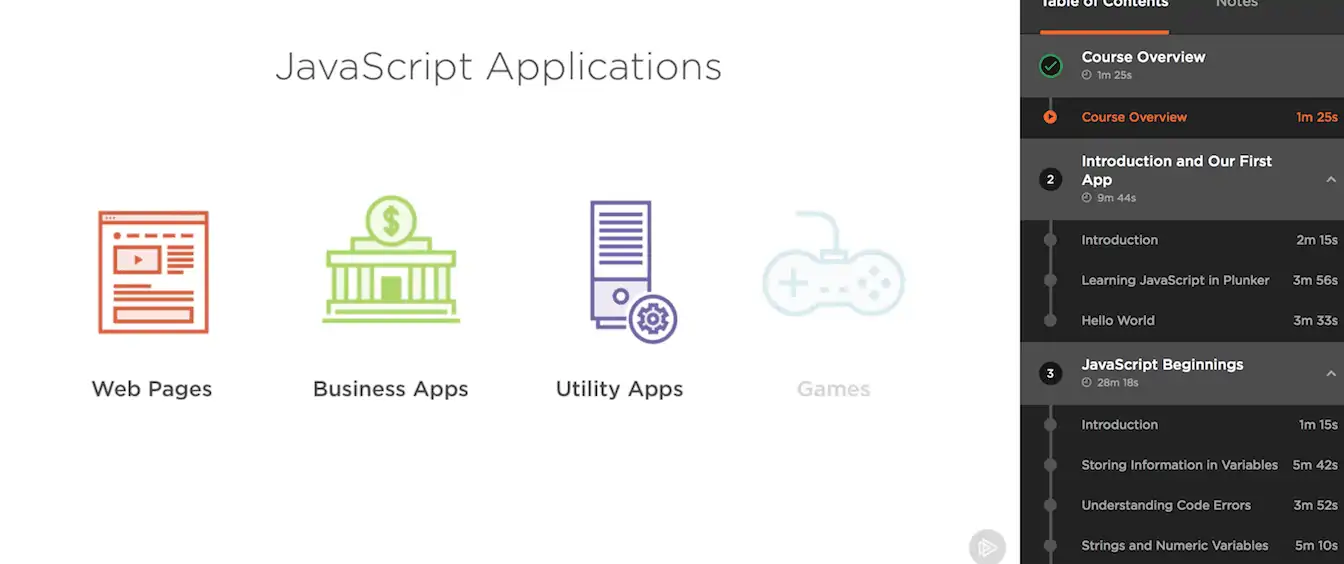
Depending on the course that is picked, there are also interactive modules where students can follow along and code simultaneously with the instructor in real-time. From there, students can then complete interactive quizzes and challenges at the end of video modules and get live feedback on their progress level.
Overall, I was extremely impressed with the layout of PluralSights video class platform which was very easy to navigate. As for the video playback, there was hardly any buffering which was also a bonus!
Activate PluralSight Free Trial
What About The Course Quality?
While a course provider might have a massive library of courses, this doesn’t always translate well into quality. So how does PluralSight stack up?
In short, I would have to give PluralSight an A- for course quality. In saying that, I have only taken a handful of courses, so I can’t speak for them all.
The reason I gave PluralSight an A- is that I found the quality to be inconsistent across the courses that I had taken. While each course was great, the layouts of the slides and the way it was taught seemed to be quite inconsistent. While this is quite minor in the grand scheme of things, I thought it was worth mentioning.
[UPDATE] After taking a few newer PluralSight courses, it seems they have now refined a better process to keep layouts and structure consistent across their classes.
Who Teaches PluralSight Courses?
Unlike other online course providers like Udemy or Skillshare where anyone can upload a course, PluralSight has a strict vetting process for all of their instructors.
This vetting process leads to industry-leading experts teaching on the platform which results in a real-world experience which is second to none.
Check out this awesome video below for the scope of expertise that PluralSight brings to the table.
Are PluralSight Courses Certified?
In short, yes! Once students have completed all of the on-demand video modules, course content, and quizzes, they will then be eligible to download their certificate of completion. These certificates are also printable for adding to a CV or resume!
While on the topic of certifications, another question I came across while writing this PluralSight review was whether or not the platform is accrediated?

While this can’t be seen on the PluralSight website, on one of their forums, a PluralSight representative noted that their courses are unfortunately not accrediated. While this is a bit of a bummer, almost all online course providers follow the same suit.
PluralSight Pricing
Another thing I looked into in my PluralSight review had to be price. Especially when comparing PluralSight to other competitors such as Treehouse, Codecadamey, and Udacity?
In a nutshell, PluralSight is on the more expensive side of the spectrum coming in at $35/mo. But when compared to providers like Treehouse ($199/mo), CodeCademy ($39/mo), they are relatively cheap for a comparable product.
As for what’s included in the PluralSight monthly membership (that can be canceled at any time), users get access to:
- All 6,500+ courses
- Learning Paths
- Learning Channels
- Skill IQ
- Course Learning Check
- Certificates Of Completion
- Exercise Files
- Mobile Apps (iOS & Android)
- Offline Viewing
Activate PluralSight Free Trial
PluralSight Customer Support
While I haven’t had any experience with PluralSight customer service, from what I have read from other users on Reddit, they seem to be OK. Not the best, not the worst, but just OK.
In saying that, using PluralSight is much like using Netflix, it’s almost impossible to screw things up as the platform is very user-friendly. If however students can’t access certificates or have billing issues, PluralSight does have a toll-free number, chat support, and ticket support.
What I Don’t Like About PluralSight
While PluralSight is an extremely great service, no online course providers are perfect. So after using the service for several months, I found two cons to the service:
- More expensive pricing when compared to Skillshare and LinkedIn Learning/ Lynda
- Limited range of courses when compared to other course providers
If I could change two things about PluralSight, it would have to be the above 2 points. While these aren’t deal-breakers by any means, they are just a couple of things that I would like to see changed in the future.
PluralSight For Businesses & Enterprises
For those that are running a small business or even a large enterprise, PluralSight also offers solutions for managers to upskill and scale up their staff training.
PluralSight also offers up their unique Skill IQ and Role IQ which tests team members on where their skill levels are, and where they can improve. From there, each team member will receive a learning path that is unique to them which is designed to be more time-efficient and effective.
While this is a more tailored solution, many Fortune 500 companies such as Adobe, Fujitsu, and NASDAQ use PluralSights services.
Activate PluralSight Free Trial
So, Is PluralSight Worth It?
In short, yes! I have found great value in using PluralSight which I haven’t been able to find anywhere else. PluralSights in-depth content around IT/ tech-related skills has helped me to better my skills and to become more competitive in my career.
So if you too want to learn new in-demand skills from some of the top companies in the world, or are just curious about a certain subject, then PluralSight is the place to be! Highly recommended!
If there is anything else you would have liked to have seen in my PluralSight review, please let me know down below as I plan on updating this review in the coming months. Thanks for reading and happy learning!
